

How do I get measurement data and result tables into Excel?
UniPlot fills Excel report templates: you design the sheet once in Excel with placeholders for header data and channels, and UniPlot inserts the data of any measurement file into it. For a plain data export, UniPlot saves data files as XLSX, and in scripts it writes Excel files directly.
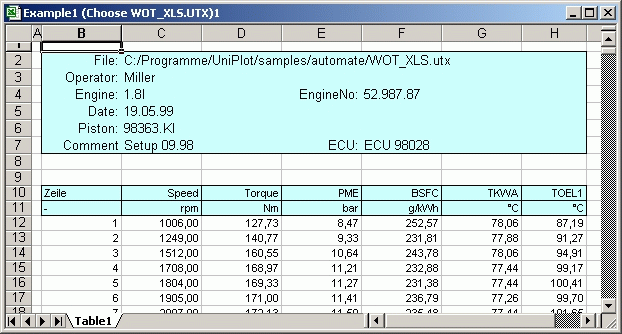
An Excel report filled by UniPlot: header data at the top, one column per channel below.
How it works
Create the template: choose File=>More File Functions=>Create Report Template. Select a typical data file, then the header data and the channels you need. UniPlot creates the Excel sheet, which you can lay out in Excel and save.
In the template,
$Operator$is replaced by a file attribute,$EngSpd.units$by a channel attribute and*EngSpd*by the values of the channel, written as a column with the cell format of the placeholder.To create a report, choose File=>More File Functions=>Excel-Report, select the template and the data file. UniPlot starts Excel, fills the template and shows the result.
In an automation script the same is done with one call:
XLSREPORT_CreateFromTemplate("UP_Temp.xls", svFile);
Why it helps
No values are copied or typed by hand, so the Excel sheet always matches the measurement.
The layout, number formats and colors are defined once in the template.
Data of several files can be compared in one sheet:
$File2:Operator$reads the attribute of the second file.
Good to know
Templates can be single-line, multi-line (
**EMPTYROW**separates the blocks) or space-saving blocks with**CHANNELNAMES**and**CHANNELS**.**ROWCOUNTER**numbers the rows.A small Excel sheet can be embedded into a UniPlot page, for example as a page header. Name the object
Excelsheetand fill it with Load Data from its context menu.To convert a data file into an Excel file without a template, use File=>Export=>NC Export with the format XLSX (with or without header data).
In UniScript,
excel_createandexcel_sheet_put_rowswrite.xlsxfiles, with cell styles taken from a template file.Diagrams are exported as vector graphics with Send To Word, Send To PowerPoint or File=>Export=>Save As WMF or BMP.