

How do I build a report template that I can reuse for every test?
A UniPlot report template is an ordinary UniPlot document (.ipw) with
diagrams, text placeholders, logos and tables. A small script file (.ic)
loads a measurement file into it. You design the layout once, and every new
test produces the same report with new data.
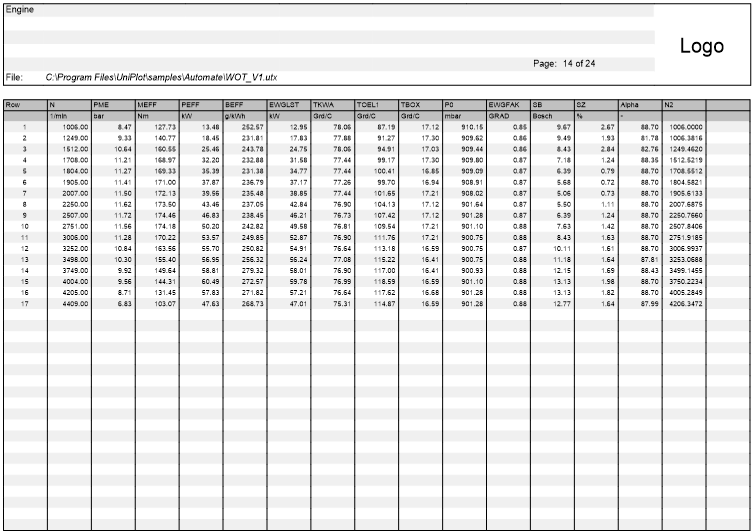
A report page with header block, logo and data table, from the UniPlot sample document.
How it works
Design the page. Create a UniPlot document with the diagrams, text objects, logo and frame you need. Give each diagram a unique name: the script uses it to put data into the right diagram. Set the axis scaling so that the interesting range is visible; the script can autoscale axes when the data varies a lot.
Add placeholders. Text between dollar signs, for example
$Engine$, is replaced when the report is created, either by text the user types or by an attribute from the data file ($Origin$is the original file name). A number sets the order in the input dialog:$(1)Title$.Add legends. A text object with
$LEGEND$becomes the legend of the page. For a legend per diagram, put a text object with@f{legend}into the diagram.Write the script. Save an
.icfile in the same directory as the template, for example:auto_AddToUI("Examples", "Example 1: Map", "RS_Example1"); def RS_Example1() { svFile = auto_GetFileNameDialog(1); if (svFile[1] == "DLG_CANCEL") { return; } auto_LoadTemplate("Example.ipw"); auto_ImportData(svFile[1]); auto_LoadDataset("Diagramm 1", "N", "EWGMOM", "EWGLST"); auto_ScaleAxes(); auto_ReplaceTextDialog(); auto_UpdatePage(); }
Install it. Enter the directory in Tools=>More Options, field Search Path for Automation Script Files. Several directories are separated by semicolons. The report now appears in the Reports menu.
Why it helps
Layout and logic are separate: the template can be redesigned without touching the script.
Every report looks the same, regardless of who creates it.
A shared network directory in the search path gives the whole team the same templates.
Good to know
A template can contain several pages. The script decides which pages are loaded and in which order;
auto_AddPageadds the next page to the same document.@f{documentname}shows the file name of the document,@f{date}the current date.Logos and title blocks that appear on every page are best placed on a master page, see the quick answers on the category page.
The examples
RS_Example1toRS_Example5inUniPlot/samples/automateare a good starting point.