

How do I fill in operator, date and other header data automatically?
Put placeholders such as $Operator$ or $Engine$ into the text objects
of your report template. When the report is created, UniPlot looks for
attributes with the same name in the measurement file and fills them in. Only
the placeholders it cannot fill are shown in a short input dialog.
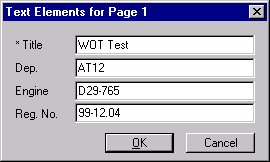
The input dialog of auto_ReplaceTextDialog. Values read from the data
file are marked with an asterisk.
How it works
In the template, type the placeholder into a text object: a dollar sign, the name, a dollar sign, for example
$Operator$.For values from the data file, use exactly the name of a global attribute of the file, including upper and lower case. Every file imported by UniPlot has the attribute
Originwith the original file name, so$Origin$always works.For an attribute of a channel, write the channel name, a period and the attribute name, for example
$Torque.long_name$or$Torque.units$.In the automation script, call
auto_ReplaceTextDialogwith the name of the imported file. The dialog lists all placeholders of the page, already filled where possible; the user completes the rest.
To control the order of the fields in the dialog, add a number in brackets
after the first dollar sign: $(1)Title$, $(2)Operator$.
Why it helps
Header data is typed once, when the data is recorded, not again for every report.
The user only sees the fields that really need input.
The same placeholders work in interactive reports and in fully automatic batch runs.
Good to know
For the current date and time no placeholder is needed: use the field functions
@f{date}and@f{time}in a text object.@f{documentname}shows the file name of the UniPlot document,@f{pagenumber}the page number.To fill the placeholders without any dialog, for example in a batch run, use
auto_ReplaceTextFromNCFile, see How do I fill report placeholders from the data file without any dialog?.Unused placeholders are removed when the page is finished with
auto_UpdatePage.