

How do I fill report placeholders from the data file without any dialog?
Call auto_ReplaceTextFromNCFile in your automation script. It searches the
report page for placeholders such as $Engine$ and replaces them with the
attributes of the imported measurement file. No dialog appears, so the report
can be created unattended, for example in a batch run.
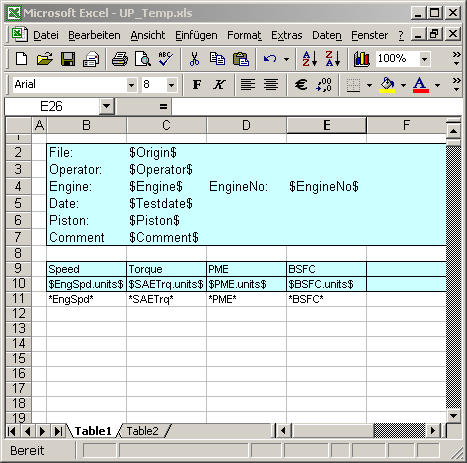
The same placeholder convention in an Excel report template: $Operator$
for a file attribute, $EngSpd.units$ for a channel attribute and
*EngSpd* for the channel data.
How it works
Use placeholders in the template whose names match the attributes in the file exactly, including upper and lower case:
$Operator$for a global attribute,$Torque.long_name$for an attribute of the channel Torque.$Origin$(original file name) exists in every imported file.Import the file with
auto_ImportData. It returns the name of the converted NC file.Pass the page and this file name to
auto_ReplaceTextFromNCFile:hPage = auto_LoadTemplate("example"); ssNC = auto_ImportData(ssFile); auto_LoadDataset("Diagramm 1", "N", "MEFF"); nReplaced = auto_ReplaceTextFromNCFile(hPage, ssNC); auto_UpdatePage();
The return value is the number of replaced placeholders, useful to check that the file contains the expected header data.
Why it helps
The last manual step of report creation disappears: reports can be created overnight or triggered by a test bench.
Interactive and automatic reports use the same templates and placeholders.
Missing header data is easy to detect from the return value.
Good to know
Placeholders that remain empty are removed by
auto_UpdatePage.In Excel report templates,
$File2:Operator$takes the attribute from the second of several data files, see How do I get measurement data and result tables into Excel?.The field function
@f{ncattribute(FileName, ChannelName, AttName)}shows one attribute of a given NC file directly in a text object.If the user should still review the values, use
auto_ReplaceTextDialoginstead, see How do I fill in operator, date and other header data automatically?.