

How do I remove spikes and sensor dropouts from a signal?
Add the filter function smooth_median() to the curve. UniPlot slides a
window along the signal and replaces each point by the middle value of the
sorted window. A single spike or dropout never ends up in the middle, so it
disappears, while steps and plateaus of the real signal stay sharp.
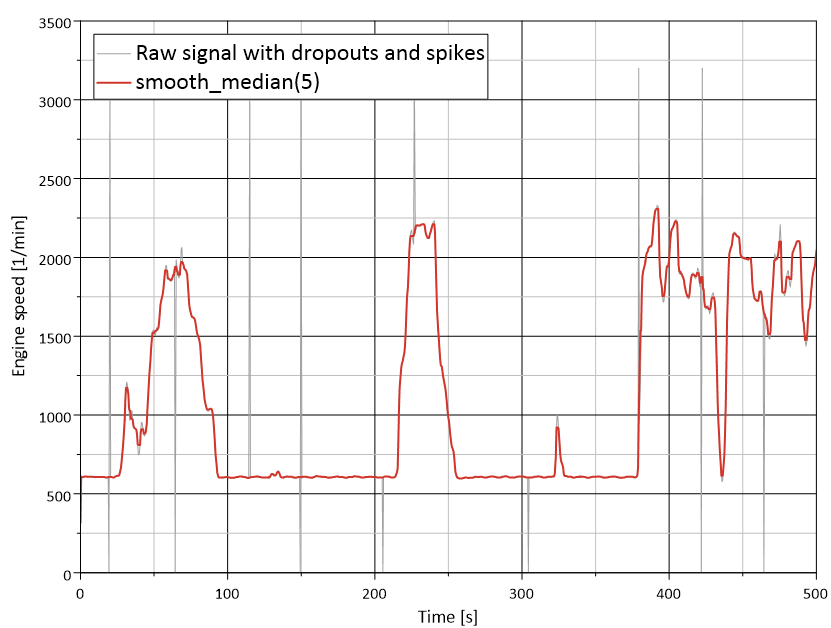
Engine speed with sensor dropouts and spikes (gray) and the result of
smooth_median(5) (red).
How it works
Click the curve in the diagram to select it.
Right-click the curve, choose Edit Filter Functions…, select
smooth_medianin the list of available filters and click =>.Click Edit and set the window size nNeighbor, between 3 and 1025. Even numbers are rounded up to the next odd number.
Click OK.
In a script:
XYSetFilterFunctions(hData, "smooth_median(5)");
A small example
With smooth_median(5), five consecutive points are sorted and the third one
is used. The input [5, 7, 6, 4, 27, 8, 4, 5] becomes
[5, 7, 6, 7, 6, 8, 4, 5]: the spike of 27 is gone. For a window of 5, the
first two and the last two points are not changed.
Why it helps
Single bad samples are removed instead of being smeared over their neighbors, as a moving average would do.
Steps in the signal, for example a change of operating point, keep their shape.
The result only contains values that were really measured.
Good to know
Choose the window larger than the longest spike: a dropout of two samples needs at least
smooth_median(5).A large window also removes short real events. Compare the filtered curve with the original before you use it in a report.
For random noise without spikes, a moving average (
smooth) or the Savitzky-Golay filter (smooth_golay) gives a smoother result. Both can be chained after the median, for examplesmooth_median(5);smooth(10).