

Can I decode CAN data with an AUTOSAR ARXML file instead of a DBC?
Yes. Since UniPlot R2026.3 the CAN configuration accepts ARXML files
(*.arxml) in the same way as DBC files. If your network description comes
as ARXML, you no longer need a separate tool to convert it to DBC before you
can import BLF or ASC log files.
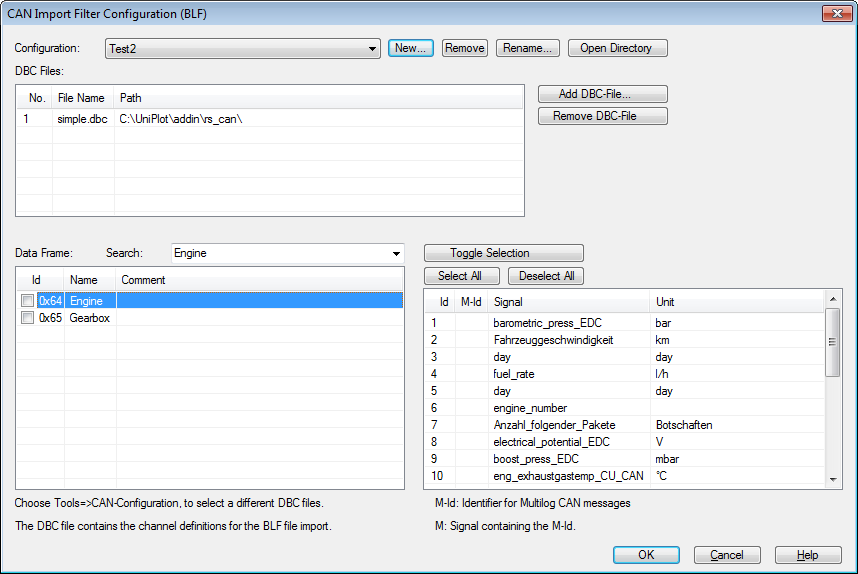
The same Tools=>CAN Configuration (DBC file) dialog is used for DBC and ARXML files.
How it works
Make sure the CAN Import add-in is loaded (Tools=>Add-In Manager).
Choose Tools=>CAN Configuration (DBC file) and add the ARXML file. Its messages are listed like those of a DBC file. The menu name still says “DBC file”, but the dialog accepts
*.dbcand*.arxmlfiles.Check the messages you need, choose the bus number (1 to 255 or “all”) and save the configuration under a name.
Import the log files with File=>Import Data and the file type
Vector CAN Log (*.blf; *.asc).
Why it helps
No conversion step between the AUTOSAR toolchain and the data analysis.
The workflow is identical to DBC files: message selection, bus numbers and named configurations work the same way.
DBC and ARXML based configurations can be kept side by side, one named configuration per project or vehicle.
Good to know
ARXML input requires UniPlot R2026.3 or later.
Everything else from the DBC workflow applies: one time channel per message, channel names are the signal names, CAN Id stored as attribute
CanID.In scripts, select the saved configuration with
can_set_active_dbc_configuration("Name")before callingauto_ImportData.